


Most listings are won or lost in 45 minutes at the kitchen table. The listing presentation is the document you walk in with — and the conversation around it — that turns "we are interviewing three agents" into "we are signing with you tonight."
This guide covers what goes into a real estate listing presentation, what separates the strong ones from the weak ones, and how to structure the appointment so it ends with a signed agreement instead of a "we'll get back to you."

What Is a Real Estate Listing Presentation?
A real estate listing presentation is the structured pitch an agent delivers to potential sellers — usually a slide deck plus a conversation — that explains how the agent will price, market, and sell the home, and asks for the listing agreement.
It is part data presentation (the CMA), part marketing plan, part credibility argument (why you, not the other two agents the seller is interviewing). Most listing presentations run 30 to 60 minutes in person and 10 to 14 slides if delivered as a deck.
The Structure of a Strong Listing Presentation
The skeleton most successful listing presentations follow:
1. Cover
Property photo, address, seller name, agent name and brokerage, date. Branded but clean.
2. Agent Introduction
Your track record in one or two slides. Number of homes sold, average days on market versus area average, percentage of list price achieved, recent client testimonials. Concrete numbers, not adjectives.
3. Market Overview
Where the local market is right now — sale-to-list ratios, months of inventory, year-over-year price change, days on market trend. This is context for the price you will recommend in the next section.
4. Comparable Sales (CMA)
Three to five hand-picked sold comps with photos, sale prices, days on market, list-to-sale ratios, and your adjustments. The CMA is the data foundation for the price recommendation. For a full breakdown on building one, see how to do a CMA in real estate.
5. Active and Pending Listings
What the home will compete against. Active listings show the landscape; pending sales show direction.
6. Pricing Strategy and Recommendation
The defensible price range and your recommended list price inside it. Explain why. Sellers respect math; they get suspicious of round numbers without reasoning.
7. Marketing Plan
The section that closes more listings than any other. Specifically how you will market this home:
- Professional photography (and any drone or twilight shots if appropriate)
- Staging recommendations
- Branded property flyers and just-listed announcements
- Social media posts (Instagram, Facebook, LinkedIn) with specific timing
- MLS syndication and which third-party sites the listing will reach
- Open house schedule and approach
- Email campaigns to your active buyer database
- Neighbor outreach (mailers, door knocks, broker-to-broker calls)
Show real examples of past marketing collateral if you have it. Sellers want to see the polish, not just hear about it.
8. Communication Plan
How often the seller will hear from you (weekly check-in by phone, daily showing feedback by text, dashboard access for stats). Sellers fear going dark after listing — a clear communication plan eliminates the fear.
9. Why You
Two or three reasons specific to this seller's situation. Not generic. If they are relocating, you have relocated 12 clients in the past two years. If they are downsizing, you specialize in seniors and have a vendor network for the move.
10. The Listing Agreement and Next Step
The commission structure, the term length, the exclusions, and a specific call to action: sign tonight, photography tomorrow, live on the MLS Thursday.
Real Examples: What Listing Presentation Slides Look Like
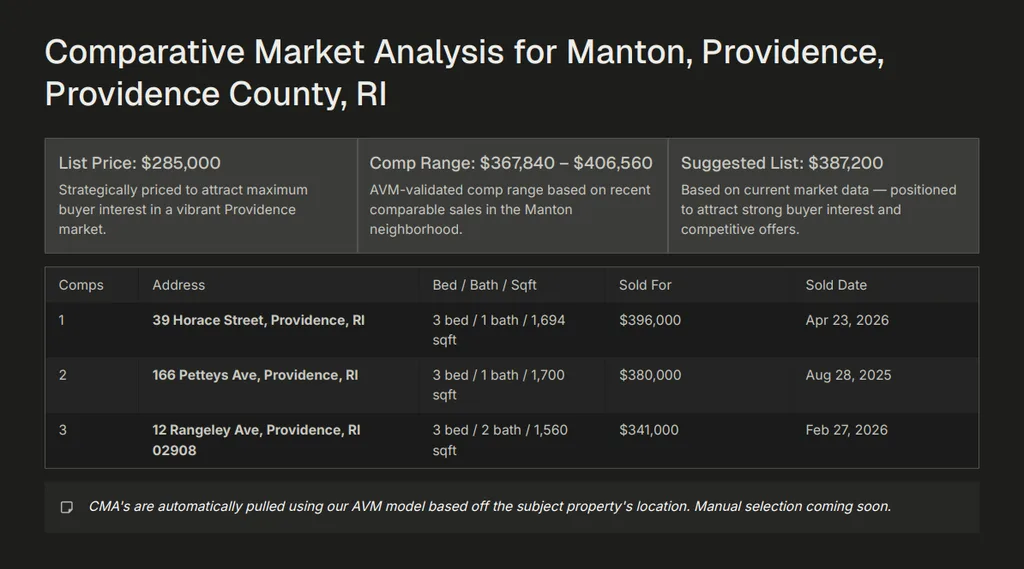
Here are three live slides from a RealAnalytica-generated listing presentation for a Providence, RI property — actual output, not a mockup. The deck is generated automatically from the contact record, MLS data, and the property's photos.
Slide 1 of 3 — Comparative Market Analysis. Side-by-side comp table with sale prices, sold dates, and the suggested list price calculated against the AVM-validated range.
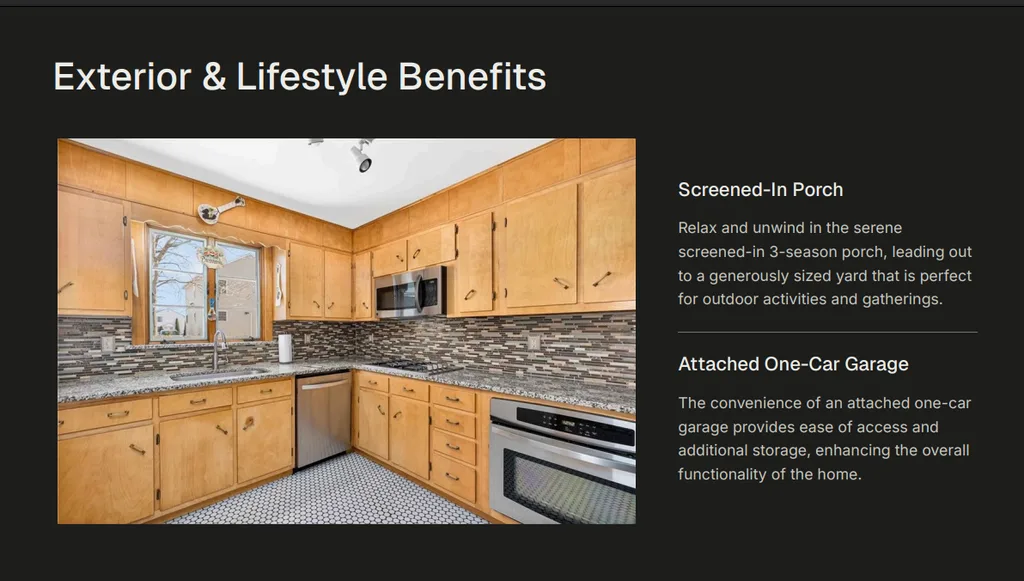
Slide 2 of 3 — Property Features. Photo plus short-form feature copy generated from the property's MLS data and condition notes. The narrative is buyer-facing language, not the dry MLS remark.
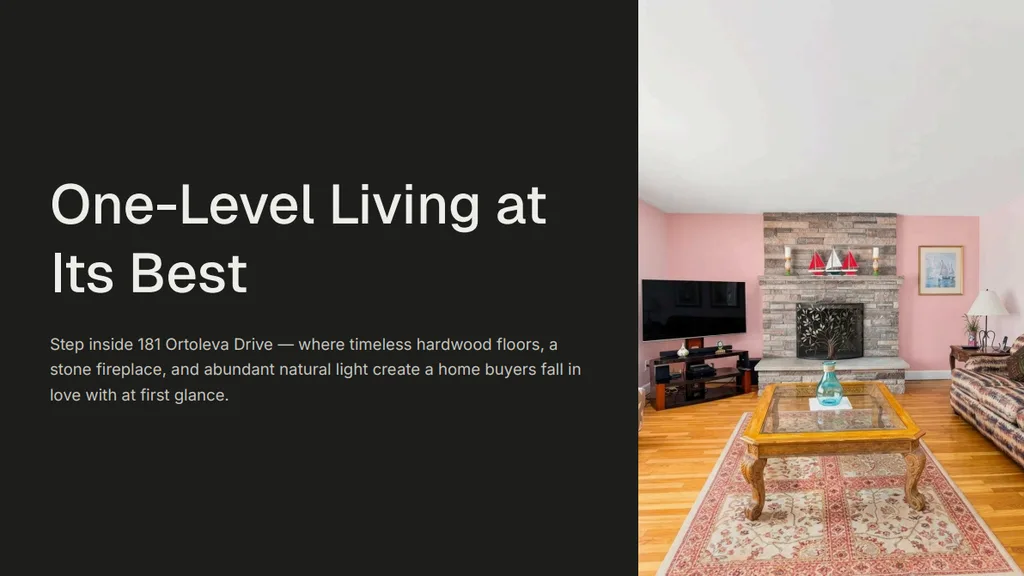
Slide 3 of 3 — Lifestyle Headline. A buyer-emotion slide built from the home's strongest single feature. This is the slide the seller imagines being shared on their listing page.
The deck above was generated in under 2 minutes from the contact and MLS record — the agent reviews and edits before the appointment rather than building from scratch.
Listing Presentation Template (Free to Adapt)
If you are building a listing presentation in PowerPoint, Keynote, Canva, or Google Slides, copy this slide order. Each line is one slide: the slide's job, and what goes on it.
Download the listing presentation template (PDF, 15 slides) — every slide below laid out with placeholder fields, the adjustment table for the comps, the price-recommendation layout, and the pre-appointment checklist on the last page. Free, no email required. Print it as-is or rebuild it in your own deck.
- Cover — subject property photo, address, date, your name + brokerage + headshot
- Agent intro — track record in 3 numbers: homes sold, average days on market, list-to-sale ratio
- Market overview — 3 to 4 area stats: median sale price, inventory, days on market, direction vs last quarter
- CMA: comp 1 — photo, sale price, sale date, adjustments, adjusted price
- CMA: comp 2 — same format; keep the adjustment math visible
- CMA: comp 3 — same format; three strong comps beat ten weak ones
- Active listings — the competition their home faces on day one
- Pending listings — where the market is moving right now
- Price recommendation — the range, the specific list price inside it, and one sentence of reasoning
- Marketing plan overview — the channels, in order of impact for this home
- Marketing plan: photography and staging — with a real example from a past listing
- Marketing plan: digital reach and syndication — where the listing appears and who sees it
- Communication plan — how often they hear from you and what a weekly update includes
- Why us — the one slide about you; everything before it was about them
- Listing agreement summary and next step — what signing today looks like
Fourteen slides at 60 to 90 seconds each = a 14 to 21 minute deck. Add discovery at the start (10 minutes) and Q&A at the end (10 to 15 minutes) and you fit comfortably in a 45 minute appointment.
The Listing Presentation Checklist
Before walking into the appointment:
- Pre-listing packet sent 24 to 48 hours earlier
- Property walked or video-toured
- CMA built with 3 to 5 hand-picked comps and clear adjustments
- Recommended price range with a specific list price inside it
- Marketing plan tailored to this specific home (not boilerplate)
- Two printed copies of the deck (in case their printer is broken)
- Listing agreement printed and ready to sign
- Pen, business card, branded folder
- One follow-up call scheduled for 24 hours later in case they want to think
What Separates Strong Presentations From Weak Ones
Strong
- Recommended price in the first five minutes
- Specific marketing plan with real example collateral
- Hand-picked comps with reasoning per adjustment
- Branded materials throughout (cover, headers, footers)
- Live shareable link in addition to printed deck
- Closes with a specific next step
Weak
- Generic 30-slide deck from a brokerage template
- Price recommendation buried at slide 22
- Marketing plan that is just bullet points
- Twelve comps with no narrowing
- Default fonts, brokerage logo only, no agent branding
- Ends with "let me know what you think"
How RealAnalytica Handles Listing Presentations
RealAnalytica generates listing presentations as part of an Atlas-agent, lead-to-close platform — the same workflow that handles the CMA, the marketing collateral, and the eventual signed agreement. Specifically:
- AI-assisted slide generation from the contact record and MLS data — the deck above was generated in under 2 minutes, then reviewed by the agent before the appointment
- Integrated CMA presentations — the comp analysis flows directly into the deck without a separate Cloud CMA subscription
- Branded materials and flyers generated from the same property record for syndication, just-listed announcements, and social posts
- Real-estate-specific sequencing kicks off automatically after the appointment — listing-agreement follow-ups, photographer scheduling, post-list status updates
- Built-in eSignature — the seller signs the listing agreement at the kitchen table or via a shareable link, inside the same session as the deck review
The result is that an agent does not switch between a CMA tool, a presentation builder, a marketing tool, and a separate eSignature subscription. The whole listing workflow lives in one place.
The Bottom Line
A listing presentation is not a sales pitch. It is a structured argument that the seller can make to themselves three days later when they are deciding between you and the other two agents. The strong ones land the price quickly, show specific marketing, and close with a specific next step. The weak ones present generic content and leave the decision to the seller's intuition.
For the related CMA workflow that powers the pricing section, see what is a CMA in real estate and how to do a CMA in real estate. For an honest read on CMA software options, see the real estate CMA software comparison.
Frequently Asked Questions
How long should a real estate listing presentation be?
Aim for a 14-slide deck delivered in 15 to 20 minutes, inside a 45-minute appointment that includes 10 minutes of discovery up front and 10 to 15 minutes of Q&A at the end. Decks longer than 25 slides usually bury the price recommendation and lose the seller before the marketing plan.
What is a pre-listing presentation packet?
A pre-listing packet is a 4 to 6 page summary you send the seller 24 to 48 hours before the appointment. It typically includes your bio, your marketing approach, what to expect at the appointment, and a sample CMA from a similar property. Sellers who read the packet walk in half-convinced, and the appointment becomes about closing rather than introducing.
Should I leave the listing presentation deck with the seller?
Yes — both printed and digital. Printed lets them flip back to specific slides; digital (especially as a live shareable link) lets them pull it up on their phone three days later when they are deciding with their spouse. Sellers who can re-read the deck without you in the room tend to choose you over the agent who emailed a PDF.
What is the most important slide in a listing presentation?
The marketing plan slide. Pricing slides win or lose credibility, but the marketing plan wins or loses the listing. Sellers price-shop multiple agents — they hire the one who shows specifically how the home will reach buyers, with real examples of past collateral, not generic bullet points.
Can I do a listing presentation virtually?
Yes, and increasingly common for relocation sellers, second-home owners, and busy professionals. The deck is the same; the delivery is via Zoom with screen share. Use a live shareable version of the deck rather than emailing a PDF afterward, so the seller can revisit specific slides while you are still on the line answering questions.
Is there a standard listing presentation template?
There is no industry-mandated template, but nearly every strong presentation follows the same 14 to 15 slide structure: cover, agent intro, market overview, three comps with adjustments, active and pending listings, price recommendation, marketing plan, communication plan, and a closing next step. The slide-by-slide outline above is free to copy into PowerPoint, Keynote, Canva, or Google Slides — what makes it yours is the comps, the marketing examples, and the branding, not the skeleton.
What should a listing presentation template include?
Five things, in this order: proof you know the market (overview stats), proof of the price (comps with visible adjustment math), the price recommendation itself, a marketing plan specific to this home with real examples, and a clear next step. If the template you are adapting is missing any of these — or buries the price past slide 15 — fix that before you brand it.
What is a digital listing presentation?
A listing presentation delivered on a screen instead of paper: a slide deck or interactive page shown on a laptop or tablet at the kitchen table, or shared by link ahead of a virtual appointment. The content is the same five sections as a printed deck. The advantages are comps you can refresh the morning of the meeting, embedded video and 3D tours, and analytics on which slides the seller re-opened after you left. Most agents run a digital deck at the table and leave a short printed summary behind.
How do you do a listing presentation?
Start with about 10 minutes of questions about the seller's timeline and goals before you open the deck, then walk the five sections in order: market overview, the comps behind your price, the price recommendation, your marketing plan for this specific home, and a clear ask for the listing. Keep the deck to roughly 14 slides and 20 minutes, and leave time for objections at the end. The template and checklist above are built in that order.